AI Humanize.Natural writing. Meaning preserved.
AI Humanize is an online text rewriting tool for writers, students and content teams. Turn AI drafts into natural writing, compare the changes and refine your text with follow-up instructions.
Input includes instructions and context. Reasoning is included in generation usage.
Keep your facts. Review your result. Refine the wording.
Real rewrites, saved for you to inspect
See how AI Humanize handles different drafts
Choose a sample to compare the original with an actual product result. Open the follow-up to see what another instruction changed. These purpose-written drafts contain fictional scenarios, not customer writing; the model outputs are shown without manual edits.
A clear request, with the deadline intact.
Generated
Original draft
Hi Morgan, I am writing to reach out regarding the draft schedule for our client workshop on October 22. It is important to note that we need your comments by 3 pm on Friday so that the team can prepare the final agenda. In particular, we would appreciate your thoughts on whether the product demonstration should come before or after the discussion. The workshop will still run from 10 am to noon, and the room booking has already been confirmed. Please let me know if you need the slides before reviewing the schedule. Thank you for your continued collaboration.
First rewrite
Hi Morgan, Could you send your comments on the draft schedule for our October 22 client workshop by 3 pm on Friday? The team needs them to prepare the final agenda. We’d especially appreciate your thoughts on whether the product demonstration should come before or after the discussion. The workshop will still run from 10 am to noon, and the room booking is confirmed. Let me know if you need the slides before reviewing the schedule. Thanks for your continued collaboration.
See the follow-up instruction and result
Follow-up instruction
Make this email warmer and shorter for a colleague. Keep the workshop date, Friday 3 pm deadline, 10 am to noon timing, confirmed room, question about the demonstration, and offer to share slides.
Result after the follow-up
Hi Morgan, Could you send your thoughts on the October 22 client workshop schedule by Friday at 3 pm so we can finalize the agenda? Should the product demonstration come before or after the discussion? We’re still set for 10 am to noon, and the room is confirmed. Happy to send the slides if you’d like them before reviewing. Thanks for your help!
The request is easier to find. Check that October 22, Friday at 3 pm, the two-hour workshop and the question about the demonstration all survive both edits.
Saved outputs, not live generation. Browsing these examples uses no credits. Your own result may differ; loading a sample does not start a rewrite.
How to use AI Humanize
How to humanize AI text
Paste your text
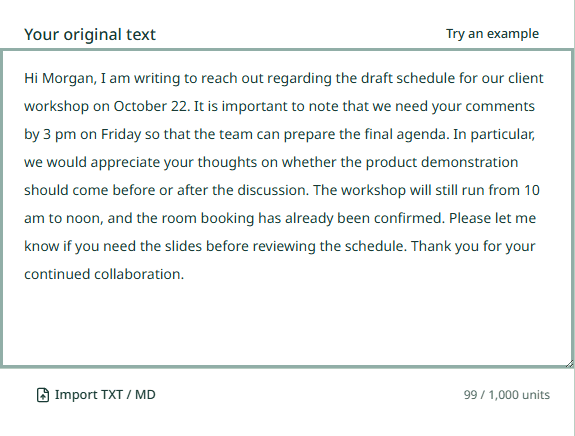
Paste your draft or import TXT or Markdown. Check the length counter, then select Humanize text when you are ready.
Humanize and review
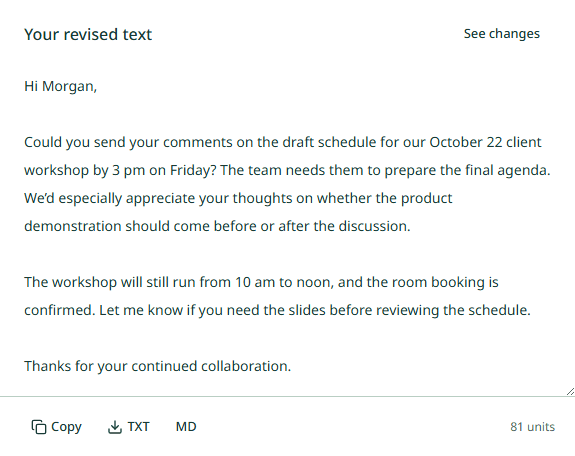
Read the result beside your original. Select See changes to inspect the revision, then check facts, names and qualifications.
Refine and use
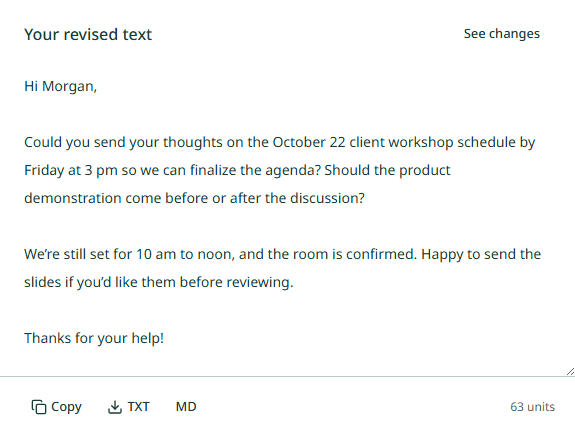
Edit directly for free, or sign in to request a follow-up. Copy the version you want or download it as TXT or Markdown.
After the first rewrite
Keep control of the next edit
Compare the wording, make your own changes and save a version worth keeping. Each follow-up starts from your current draft, so you can work on one change at a time.
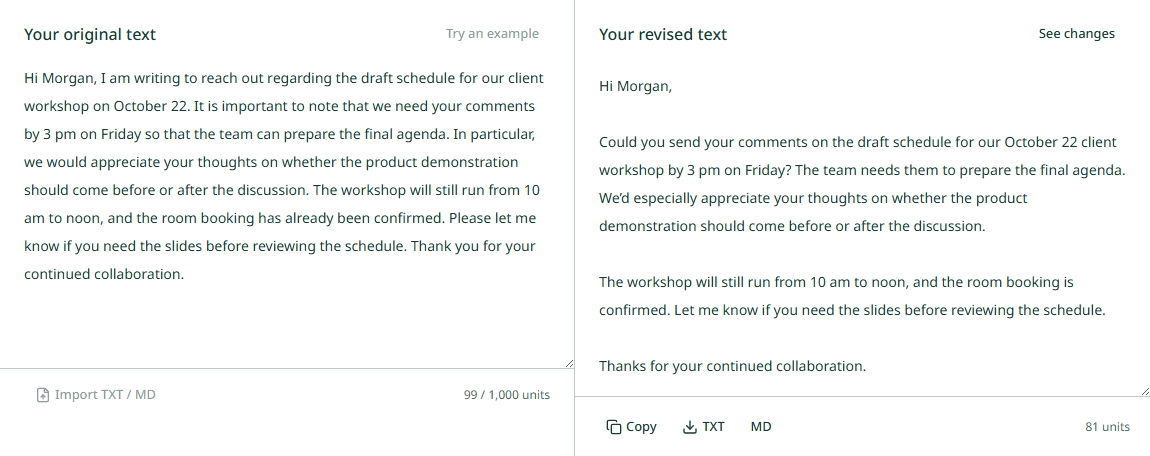
Different drafts, the same careful edit
Find your starting point.
Essays
Give each paragraph a job. Keep the argument and evidence while cutting the phrases that get in their way.
Academic writing
Make the sentence easier to follow without making the claim stronger than the evidence.
Emails
Make the request easy to find, with a tone that fits the person reading it.
Resumes
Let the work you did carry the sentence. Keep every achievement grounded in your experience.
Cover letters
Replace general enthusiasm with the reason you are applying and the experience you can explain.
Paragraphs
Keep one point in focus. Give the reader a clear path from the first sentence to the last.
Room for your next draft
Start with free credits. All plans share the same model capacity; paid plans provide more credits.
Good questions
AI humanize: answers before you start
What does AI Humanize change?
It revises repetitive, inflated or stiff wording while aiming to preserve your meaning, facts and original language. Review the result before using it, especially names, figures, citations and any claim that depends on evidence.
Can I try it for free?
An anonymous visitor gets one successful trial. New accounts receive 10 permanent credits after their first verified login. This gift is granted once; there is no daily refill.
How are rewrites and follow-up edits charged?
Each completed rewrite or follow-up is billed by actual input and generation tokens, including reasoning without double counting. Input includes your text, instructions and context. Unused reserved credits are returned. Manual edits, importing, copying, downloading and reading your saved history are free. A confirmed failed task releases its reserved credit; an uncertain task stays pending until resolved.
What happens to my writing after I leave?
Accepted tasks continue on the server. Signed-in writing and versions stay in your history until you delete them. Anonymous results are available for up to 24 hours after completion; signing in can attach that result to your account.
Will the result pass an AI detector?
There is no detector score or bypass guarantee. The tool focuses on readable writing. Follow any disclosure or authorship rules that apply to your work, and check every rewrite yourself.
Can I humanize text in a different language?
The website is in English, but the editor keeps the draft’s original language by default. Language pages offer examples and review guidance. They do not translate the website or guarantee identical results across languages. Check the phrasing with someone who knows the language and intended reader.
What should I check before submitting private text?
Your text and necessary editing context are sent through APIMART to the language model to produce a rewrite. We do not promise zero retention by external providers. Only submit text you are entitled to share. You can delete saved articles from your account; limited task and financial records may remain. See our privacy policy for provider processing and retention details.
How much text can I humanize at once?
All token-billed plans share the model capacity: up to 922,000 input tokens and 12,800 generation tokens. Input includes instructions and context; generation includes reasoning. These are token limits, not word limits. Your balance may reduce the output allowance, so an input that fits does not guarantee an equally long complete rewrite. Review the allowance before confirming.
How much writing do 10 credits cover?
There is no fixed number of words or rewrites. At the standard uncached input rate, a request using 1,000 input tokens and 1,000 generation tokens costs 0.12 credits. Ten credits cover about 83 requests with that exact usage. This is an illustration, not a typical-result promise: context, reasoning, caching and long-input rates change the charge. The editor shows the maximum temporary hold and output allowance before confirmation; unused reserved credits are released.
How long does a rewrite take, and what if it fails?
Time varies with text length, reasoning and provider availability; we do not promise a fixed completion time. Accepted tasks continue on the server if you close the page. Check your task or signed-in history before starting again. Confirmed failures release the reserved credit once; uncertain tasks remain pending until reconciled. Contact support if a task stays unresolved.
Do credits expire, and how do annual plans work?
Basic provides 120 credits and Pro 300 credits per subscription month. Unused subscription credits expire at the end of that monthly window, including on annual plans. Annual subscriptions are paid upfront and still issue credits monthly. The 10-credit welcome gift and purchased 50-credit packs do not expire. There is no daily free refill.
How do I cancel renewal or change my plan?
Open Billing in your account to review the available actions. Cancelling renewal keeps the already-paid access period. Changes depend on provider support; check the amount, effective date and renewal details before confirming. Downgrades and billing-cycle changes take effect at the relevant paid-period boundary after the replacement payment is confirmed.
Can I request a refund?
Email support@ai-humanize.net with your order identifier and a short explanation. Cash refund requests are reviewed manually and are not automatically approved. Releasing reserved credits after a failed rewrite is separate from refunding a payment. Deleting a successful result does not refund its usage charge.
Read our privacy policy and terms of service, or contact support for help with your account.